Email Marketing Benchmarks for Opens Clicks and Revenue
Does sending 1,000 emails produce one buyer? Learn typical open, click and conversion rates, revenue per email, and how to build campaigns with AI.
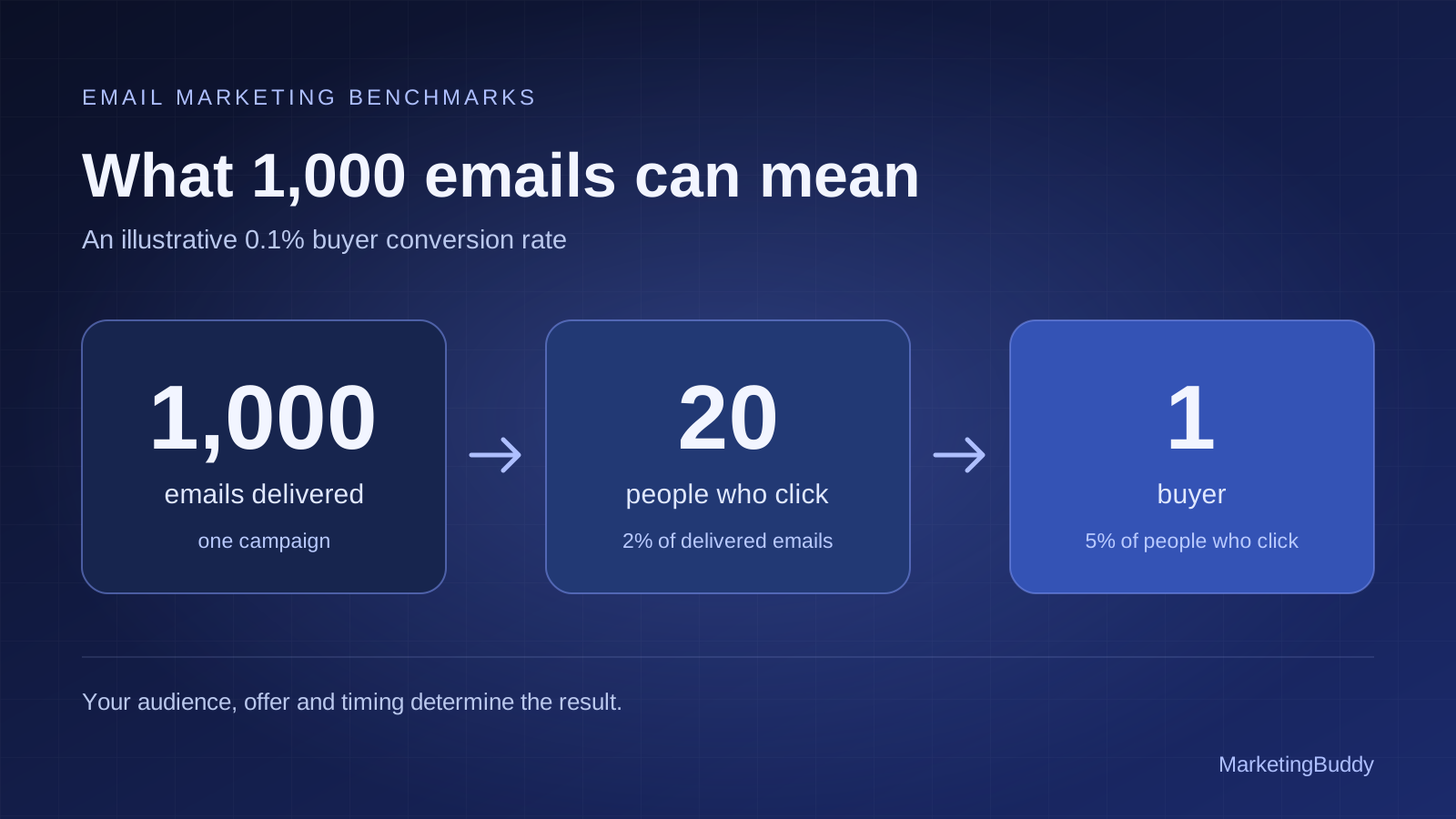
Send 1,000 emails, get one buyer. It is a useful way to start thinking about email marketing: a large audience becomes a smaller group of interested people, and a smaller group again becomes customers.
One buyer from 1,000 delivered emails is a 0.1% buyer conversion rate. That can be a reasonable planning scenario for a campaign, but your results depend on who receives it, what you offer and when you send it. A welcome email to a new subscriber and a newsletter to someone who has ignored you for six months have very different jobs.
To improve results, measure the path from delivery to clicks to purchases, then build campaigns and automations around the customer's stage. MarketingBuddy's AI Email Agent helps you do that work, from audience selection and copy to preparing campaigns and reviewing available performance data.
Typical email marketing benchmarks in 2026
These published ecommerce benchmarks give you reference points for scheduled campaigns and automated flows. A campaign goes to a selected audience at a chosen time. A flow starts when someone takes an action, such as subscribing or abandoning checkout.
| Metric | Campaigns | Automated flows | Source |
|---|---|---|---|
| Reported open rate | 31% | 32.2% | Klaviyo 2026 benchmarks |
| Click rate | 1.69% | 5.58% | Klaviyo 2026 benchmarks |
| Purchase conversion rate | 0.08% | 1.49% | Omnisend benchmark analysis of its 2025 dataset |
| Revenue per email sent | $0.18 | $2.87 | Omnisend 2026 report on 2025 activity |
Each row belongs to the source shown. These providers and analyses use different samples and reporting methods; the rows do not describe one combined funnel. Compare your own results with a similar industry, audience and message type. These are ecommerce reference points, so an app selling annual subscriptions or a B2B service should also build its own baseline.
The 0.08% campaign purchase rate works out to roughly one purchase per 1,250 emails. That puts the “1,000 emails for one buyer” idea in the right neighborhood for that particular dataset. A purchase can come from an existing customer, though, so it is not necessarily a new buyer.
How 1000 emails can turn into one buyer
Here is a simple example using assumed numbers, separate from the benchmarks above:
| Stage | Result | Calculation |
|---|---|---|
| Emails delivered | 1,000 | The starting audience for this send |
| Recorded unique opens | 300 | 30% of delivered emails |
| People who click | 20 | 2% of delivered emails |
| Buyers among those clickers | 1 | 5% of the 20 people who clicked |
| Buyer conversion rate | 0.1% | 1 buyer ÷ 1,000 delivered emails |
1,000 delivered emails × 2% click rate × 5% buyer conversion among clickers = 1 buyer.
The open rate is useful context, but it does not belong in that multiplication: the 2% click rate already uses delivered emails as its denominator. Multiplying by the open rate again would undercount the expected buyers.
Small improvements change the outcome. At 4% click rate and the same 5% buyer conversion among clickers, the example produces two buyers. At 4% and 10%, it produces four. Those are scenarios to test against your data, not forecasts.
Also separate emails sent from people reached. Four campaigns delivered to the same 1,000 subscribers produce 4,000 email deliveries. They do not create an audience of 4,000 people, and they do not guarantee four new buyers.
What open rate and click rate actually tell you
Open rate measures recorded attention
Open rate usually means unique recorded opens divided by delivered emails. It helps you compare subject lines, sender names and audience segments within your own account.
An open is not proof that someone read your message. Apple's Mail Privacy Protection and other automated activity can inflate tracking, while blocked images can hide real opens. Filter bot activity where your provider supports it, and judge sales emails alongside clicks and purchases. Mailchimp explains these tracking limitations.
Click rate measures the next action
For this article, click rate, or click-through rate, means unique people who clicked ÷ delivered emails × 100. Count a person once even if they click several links.
Click-to-open rate uses a different denominator: unique clickers divided by unique recorded openers. In the example above, click rate is 2%, while click-to-open rate is about 6.7%. Check which metric your dashboard shows before comparing results.
If people open but rarely click, examine the offer, the audience and the next step. A clear button leading to the exact product or signup page gives the reader a more useful action than a generic link to your homepage.
Conversion rate needs a named outcome
An email conversion could mean a purchase, a trial, a booked demo or a download. Decide which one you are measuring. For the one-buyer example, the outcome is a unique buyer; for ecommerce reports, it may be attributed orders.
Track first purchases separately from repeat orders. For an app, follow the path from email click to signup, activation and paid subscription. A free account is useful progress, but it does not yet answer how many buyers the email produced.
How to calculate email revenue
“Revenue rate” can mean several things. Revenue per email is useful for comparing sends; email's share of revenue tells you how much of the business is attributed to the channel.
Use a consistent denominator. In the following examples, revenue per delivered email means attributed revenue divided by delivered messages. A provider reporting revenue per email sent, as in the benchmark table, may include messages that did not arrive.
Revenue from 1000 delivered emails
Assume each buyer places one $80 order:
| Buyer conversion | Buyers | Revenue | Revenue per delivered email |
|---|---|---|---|
| 0.1% | 1 | $80 | $0.08 |
| 0.3% | 3 | $240 | $0.24 |
| 1.0% | 10 | $800 | $0.80 |
These are illustrative outcomes at the same order value. They show why a conversion improvement can matter more than adding another thousand addresses to the list.
For subscriptions, report the actual initial payment separately from any estimate of future customer value. For physical products, account for discounts, refunds, product costs and fulfillment before deciding whether the campaign was profitable. Our guide to CAC, LTV and marketing economics explains how those numbers fit together.
Email revenue share and attribution
Email revenue share = revenue attributed to email ÷ total business revenue × 100. If email receives credit for $2,000 of $10,000 in revenue during the same month, the attributed share is 20%.
Keep the attribution window and model consistent when comparing campaigns. Your email platform and website analytics may credit the same order differently. Do not add their reported revenue together, or assume every attributed order would disappear without email. Use tagged links, verified purchase tracking and, when volume allows, a randomized holdout group to estimate the additional sales email creates.
How to structure an email marketing campaign
Choose one audience and one outcome
Start with a specific brief: “Help subscribers who have not bought choose their first product.” That gives you a clearer message than “Send something to the whole list.”
Useful segments include new subscribers, interested non-buyers, first-time customers, repeat buyers and customers overdue for another purchase. For a subscription business, use stages such as new signup, active trial, paying customer and canceled customer.
Use clicks, purchases and product activity to judge interest alongside available open data. Exclude people who have already completed the campaign's goal and anyone who has unsubscribed or is suppressed.
Build the message around one next step
A practical sales email has six parts:
- Subject line: a specific reason to open that matches the message.
- Preview text: an extra detail that supports the subject.
- Opening: the customer's problem or desired result.
- Offer: what they can buy or try, and why it fits them.
- Proof: a real review, product demonstration or relevant example.
- Call to action: one primary destination, such as “Choose your starter kit.”
Keep the mobile version easy to scan. Make the button visible, test every link, and ensure the landing page repeats the same price, promise and offer terms. Use urgency only when there is a real deadline or stock constraint.
Plan the sequence before sending the first email
For a launch, a useful starting sequence is an introduction, an email answering the main objection, and a reminder near a genuine closing date. Give each message a separate purpose and stop acquisition reminders when someone buys.
For ongoing campaigns, start with a manageable cadence, such as one useful email a week, then adjust using conversions, unsubscribes and complaints. One possible four-week plan is:
| Week | Message | Primary action |
|---|---|---|
| 1 | A practical tip tied to the customer's problem | Read or try the advice |
| 2 | A product demonstration or customer example | Explore the relevant product |
| 3 | Answers to a buying objection | Compare options or start a trial |
| 4 | A relevant offer or product update | Buy or upgrade |
This is a starting calendar to adapt to your business. Account for the automated emails each person also receives, and use frequency limits to prevent campaigns and flows from piling up.
Email automations to build first
Automations connect the message to something the customer just did. The schedules below are starting configurations to test against your purchase cycle. Each flow needs an entry trigger, eligible audience, delays, a goal and exit rules.
Welcome new subscribers
Trigger: someone opts into marketing emails.
Send the first message promptly: introduce the business, deliver any promised resource or incentive, and give the subscriber one useful next step. A second message a couple of days later can demonstrate the product. A third can answer a common buying question.
Exit the first-purchase sales sequence when the person buys and move them into the appropriate customer journey. Someone who is already a customer needs a different welcome from someone discovering the product.
Recover abandoned checkouts
Trigger: an eligible subscriber starts checkout and does not complete it.
Try a reminder after a few hours, then a follow-up the next day if the purchase is still incomplete. Show the relevant item, link back to checkout and answer questions about shipping, returns or payment. Test an incentive only when the margin supports it.
Check for a completed order before every step. A purchase should stop the reminders, and a new abandonment should not create overlapping copies of the same sequence.
Help customers after purchase
Trigger: a completed order or a new paid subscription.
Help the customer get value: setup instructions, practical usage advice and a route to support. Time a review request for after they have had a realistic chance to use the product. Offer a complementary item when it fits what they bought.
Keep essential order and account messages separate from optional promotional follow-ups so marketing preferences are respected.
Convert trials and onboard app users
Trigger: someone starts a trial or signs up for your app.
Guide them toward the action that demonstrates the product's value. If they have not finished setup, send setup help. If they have already reached that milestone, show the next useful feature. Base trial-ending reminders on their actual trial end date and stop upgrade prompts when they become a paying customer.
Bring back lapsed customers
Trigger: a customer passes the normal reorder or renewal window without returning.
A consumable product may need a reminder after weeks; an expensive durable product may need a different approach entirely. Share a relevant improvement, replenishment option or reason to return. If a short reactivation sequence gets no meaningful engagement, reduce or stop promotional sends to that segment.
Add browse abandonment, replenishment or back-in-stock flows when the necessary customer events and product data are reliable. For a shorter setup guide, see the four email flows to build before a newsletter.
Improve the weak point in your email funnel
Review campaigns and flows separately, then decide where the next test belongs:
| What you see | What to investigate |
|---|---|
| Delivery falls or complaints rise | Consent, list quality, authentication and sending frequency |
| Recorded opens fall | Sender recognition, subject lines, audience fit and tracking changes |
| Opens hold up but clicks fall | Offer relevance, message clarity and the primary call to action |
| Clicks arrive but purchases do not | Landing page, price, checkout friction and purchase tracking |
| Orders rise but profit does not | Discounts, order value, refunds and fulfillment costs |
Authenticate your sending domain and make unsubscribing easy. Google's guidance recommends SPF, DKIM and DMARC, with additional requirements for bulk senders. These details support deliverability before you start optimizing copy. Google's email sender guidelines.
Test one meaningful change at a time within comparable audiences. A list producing one or two purchases per send is too small to declare a reliable winner from a single A/B test. Look for consistent results across several comparable sends and allow the same conversion window for each.
Let the MarketingBuddy AI Email Agent handle the work
Turning this plan into a working email program means maintaining audiences, writing messages, checking timing and reviewing results. MarketingBuddy's AI Email Agent brings those tasks into the tools you already use.
With your business context and supported email connections, it can:
- Build lists and segments around signups, buyers and customer stages.
- Write campaigns and nurture flows in your brand voice using your products and confirmed offers.
- Prepare campaign and flow setup through the actions available in your connected provider.
- Review available reports for delivery, opens, clicks, conversions and revenue, and help identify the next change to make.
- Use shared business context from your other marketing agents so email fits the current launch, audience and offer.
Supported connections include Klaviyo, Mailchimp, Brevo, Omnisend and Resend. Available setup actions and reporting vary by provider; for example, Mailchimp Customer Journey editing remains in Mailchimp. The agent can prepare the copy and plan around those limits.
You review the audience, message and timing before a send or schedule is approved. Automated delivery requires an approved, enabled flow and then follows its configured triggers. Connected customer events and purchase tracking supply the information those flows need.
Start with a brief like this:
Review our email performance and explain what happens for every 1,000 delivered emails. Separate campaigns from automations and first purchases from repeat orders. Find the weakest step, then prepare a welcome flow, an abandoned checkout flow and next month's campaigns in our brand voice for my review.
Frequently asked questions about email marketing results
Is one buyer per 1000 emails normal
It represents a 0.1% buyer conversion rate and can be a useful campaign planning assumption. Actual results vary by audience, offer and message type. Measure unique new buyers separately from total orders, and replace the assumption with your own baseline as data builds.
What is a good email open rate and click rate
Klaviyo's 2026 reference points are 31% opens and 1.69% clicks for campaigns, compared with 32.2% and 5.58% for flows. Use the relevant message type for comparison and account for automated open tracking. Klaviyo email benchmarks.
How much revenue should 1000 emails generate
Calculate it from your conversion rate and average order value. At 0.1% buyer conversion and one $80 order per buyer, 1,000 delivered emails produce $80. At 0.3%, they produce $240. Neither example includes costs or promises a particular result.
Should a small business start with campaigns or automations
Start with a welcome flow and the customer journey closest to revenue, such as checkout recovery or trial onboarding. Add a consistent campaign schedule once those flows work, and check that the same person is not receiving duplicate messages.
Can AI manage email marketing for my business
MarketingBuddy's Email Agent can prepare audiences, write campaigns and sequences, use supported provider actions and review the data your connections expose. You supply the business decisions and approve delivery. Meet your AI Email Agent to turn the plan into your next campaign.
- Email marketing
- Email benchmarks
- Email automation
- Email flows
- AI email agent
- Conversion rate
Let your AI run the marketing. You keep the final say.
Connect your ads, analytics, store and email, and approve every change before it goes out.